Popups
A popup is a window over the page: a newsletter sign-up, an offer, a consultation form, a notice. Popups are templates, made with the builder.
Making a popup
- Go to Templates → Add template → Popup, name it and create it.
- Build its content like any page: a heading, a text, a form, an image, buttons.
- Open Template settings and set when and where it opens (below).
- Add display conditions, such as Entire site or Front page, and click Save display settings.
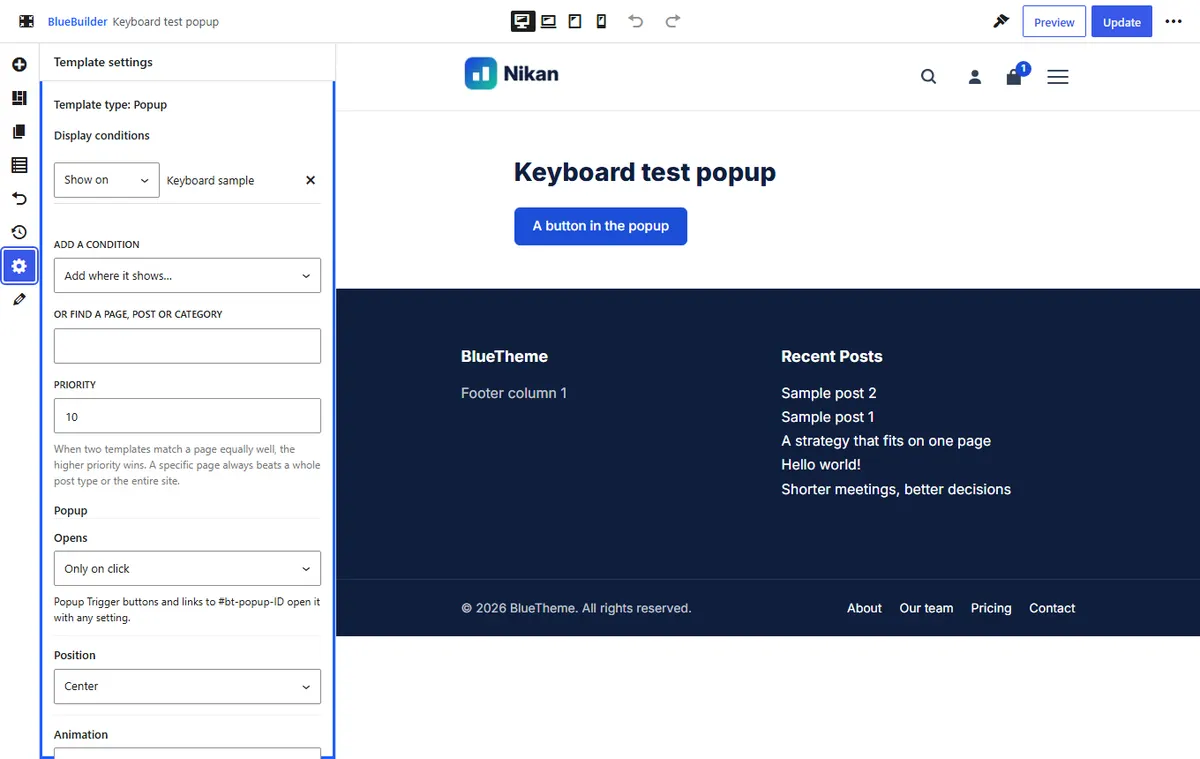
When it opens
| Setting | Choices |
|---|---|
| Opens | As soon as the page loads, After a delay (in seconds), When the page is scrolled (a percentage of the page), When the pointer leaves the page (desktop), or Only on click. |
| How often | On every page view, Once per visit, Once every few days (with Days between), or Only once. |
| Do not open by itself on | Devices where it never opens by itself, such as mobile. A button can still open it. |
"How often" is remembered in the visitor's browser; the theme sets no cookies for it.
How it looks
| Setting | Choices |
|---|---|
| Position | Center, top, bottom, a bottom corner, full height at the start or end side, or full screen. |
| Animation | Zoom in, fade in, slide up or down, slide from the start or end side, or none. |
| Width | The popup's width. |
| Dim the page behind it | Darkens the page (in the Dimming color) and keeps the keyboard inside the popup until it closes. Turn it off for small notices that leave the page usable. |
| Close on a click outside it | Closes when the visitor clicks the dimmed page. |
| Close button | The × in the corner. Esc always closes a popup. |
Opening a popup with a button
- Popup Trigger element: add it to any page, choose the popup and the button's text and style. The popup then also shows on that page, whatever its display conditions say.
- A link: any link to
#bt-popup-ID, where ID is the popup template's number (shown in its address in the builder), opens it on pages where the popup shows. Use Only on click for popups that should open only this way. - Closing: a Popup Trigger set to Close the popup it is in, or a link to
#bt-popup-close, inside the popup closes it, for a "No thanks" button.
Tips
- Keep popups short. A popup that opens at once on a phone covers the whole page: prefer a delay, scrolling or exit, or turn it off on mobile.
- Search engines may rank pages lower when a large popup hides the content as soon as a visitor arrives from search. A small corner popup or a delay avoids that.
- To test a popup set to open Only once, use a private browser window, or clear the site's data in your browser.